10 Audit Log and Evidence Integrity
TraxrGRC records every change to its records and configuration, every sign-in and refused request, in an append-only audit log protected by a hash chain. This chapter describes what is recorded, how to search and export it, how to verify its integrity, how retention works, and how to present it to an auditor.
10.1 What is logged
Every entry records:
| Field | Content |
|---|---|
| When | The server time, to the millisecond (shown to the second) |
| Actor | The email of the person, SCIM, system, or the typed email of a failed sign-in |
| API token | The token id, when the change came through the REST API |
| IP | The client address, as reported through TRUSTED_PROXY_HOPS |
| Module | The module, for example risks, users, auth, security |
| Action | What happened, for example create, update, delete, sign-in |
| Entity and Entity ID | The record type and its identifier |
| Changes | A before and after record of the fields changed, where applicable, and the source when a change was made on someone's behalf (for example a CSV import or a questionnaire) |
The categories recorded:
| Category | Module and actions |
|---|---|
| Record changes | Each module's create, update and delete, plus workflow actions such as publish, submit-for-approval, acknowledge, transition, close, reopen, review, attest, apply and import; for evidence, link, unlink, lock (an automatic lock has actor system or the person recording the test result, and automatic: true), unlock (with the reason) and verify (the file check's counts, naming any changed or missing file); attachment create entries carry the file's SHA-256 |
| Users, groups and roles | users create, update, delete on users, groups and roles (role entries hold the full permission matrix; user updates name groups on both sides, while a create records group ids); sessions.revoke; sso.link; timezone.update; password.change, password.change.failed; mfa.enroll.started, mfa.enabled, mfa.reset |
| Sign-ins | auth sign-in (method, whether a break-glass administrator signed in with a password under SSO only, and mfaPending when the session waits for the two-step verification step), sign-out, sign-in.failed, lockout, account.guarded; the two-step verification step as mfa.verified, mfa.failed, mfa.locked and, during setup, mfa.enroll.failed |
| Refused requests | security permission.denied: a screen action, API call, API token or SCIM request refused, with the module and right or the reason (including rate-limited for an API token over its request budget) |
| Settings | settings update for integrations (every field, secrets only as changed or unchanged, the IdP certificate as a SHA-256 fingerprint), sessions, separation of duties and other settings |
| Provisioning | SCIM user and group changes with actor SCIM and the token; scimToken.create, scimToken.rotate, scimToken.revoke; scim.link, scim.link-refused, scim.deprovision |
| Audit log | auditLog verify (each integrity check and its result) and auditLog delete (each prune, with the cutoff and count) |
| Backups | Export, restore and backup failure entries (see Backup and Restore) |
Failed sign-ins carry a reason:
| Reason | Meaning |
|---|---|
unknown-user | No account has that email |
no-password | The account has no local password |
bad-password | Wrong password |
inactive | The account is deactivated |
locked | Refused by the throttle; the detail names the lock (pair-locked, ip-locked, account-guarded, passwordless-locked) |
sso-only | Password or LDAP sign-in refused because SSO only is on |
method-disabled | LDAP or SAML is switched off |
ldap-rejected | The directory refused the user or could not be reached; the detail says which |
ldap-no-mail | The directory entry has no mail attribute |
link-refused | LDAP or SSO asserted the email of an account that may not be linked |
saml-invalid | The SAML response failed validation; the detail gives the check |
saml-replay | The SAML assertion had already been used |
invalid-input | Malformed request |
No account is created for an unknown email by a failed sign-in.
To keep the log from flooding, failed sign-ins are recorded at most 60 a
minute per address, and refused requests at most 10 a minute per person (or
per address without a valid token). The next entry written records how many
were dropped (suppressedBefore).
Changes are recorded in the same database transaction as the change itself wherever the change is transactional, so a change that commits always has its entry. A CSV import writes its entries together just before the import commits, each marked with the import as its source, plus one summary entry.
10.2 The Audit Log page
Open Settings → Audit Log (address /settings/audit-log) from its card
on the Settings page; security alert emails link to it too. Viewing needs auditLog:read at All, held by administrators and by the
built-in GRC Manager and Auditor roles.
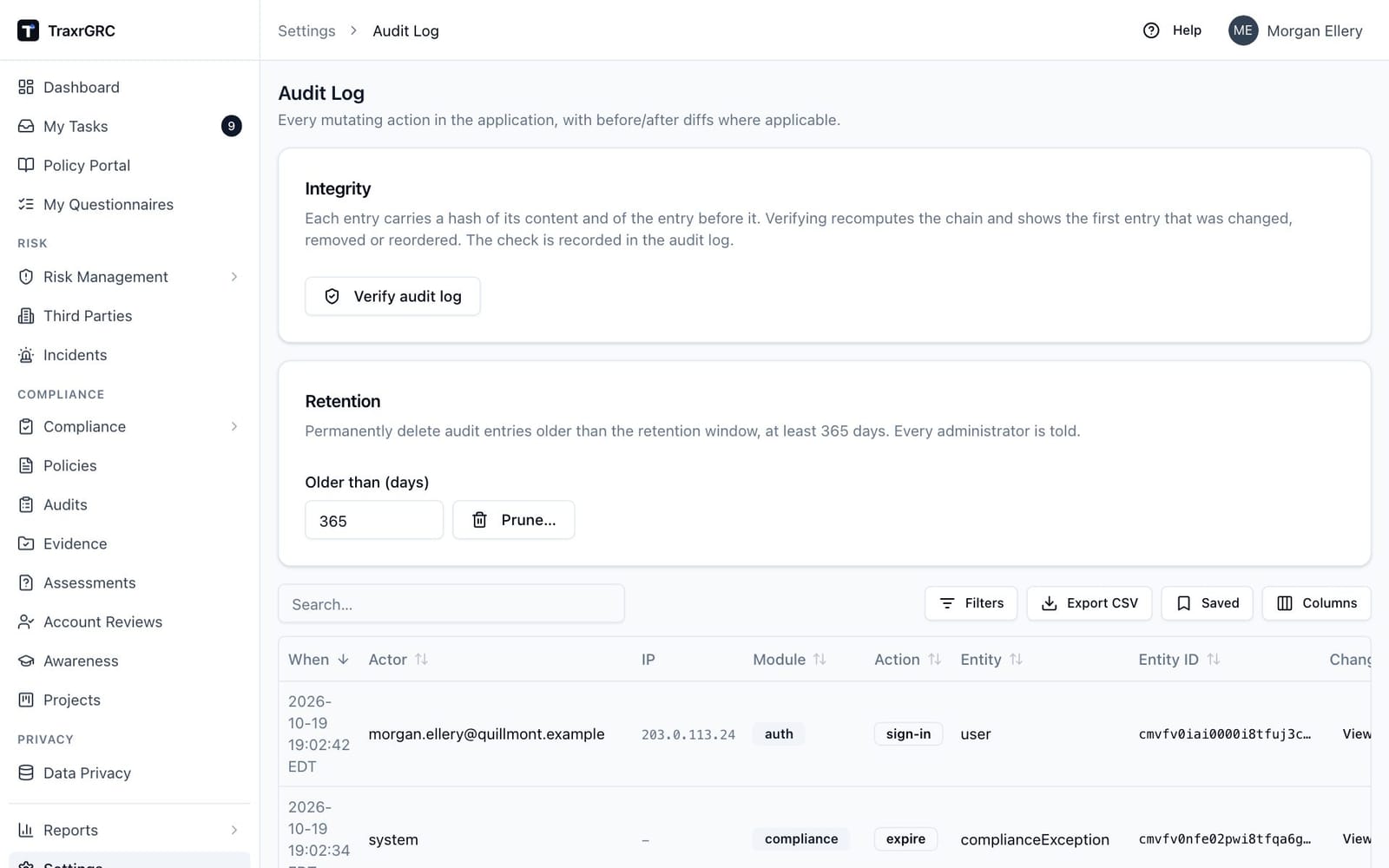
Administrators see two cards above the table, Integrity and Retention; other readers see only the table.
10.2.1 Searching and filtering
- Search… matches the actor, entity type, entity ID and action.
- Filters opens a panel with a filter for each column: free text for Actor, IP and Entity ID (matching any part of the value), dropdowns for Module, Action and Entity whose options are the values present in the log, and a date picker for When, which shows the entries of that calendar day in your display time zone.
- The log opens sorted by When, newest first. Click a column heading to sort another way.
- Saved stores the current filters under a name, for example "Sign-in
failures" (module
auth, actionsign-in.failed), for reuse. - Columns hides and shows columns.
Useful filters:
| To find | Filter |
|---|---|
| Every refused sign-in | Module auth, Action sign-in.failed |
| Lockouts | Module auth, Action lockout or account.guarded |
| Who changed a role | Module users, Entity role |
| Group membership changes | Module users, Entity group |
| Administrator rights granted | Module users, Entity user, then View diff for isAdmin |
| Refused requests | Module security, Action permission.denied |
| All changes to one record | Entity ID set to the record's id (from its address) |
| What one person did | Actor set to their email |
| Everything on one day | When set to that date |
| Activity from one address | IP set to the address, or its first part for a range |
| Two-step verification failures | Module auth, Action mfa.failed |
| Changes by provisioning | Actor SCIM |
| Integrity checks | Module auditLog, Action verify |
10.2.2 Viewing a change
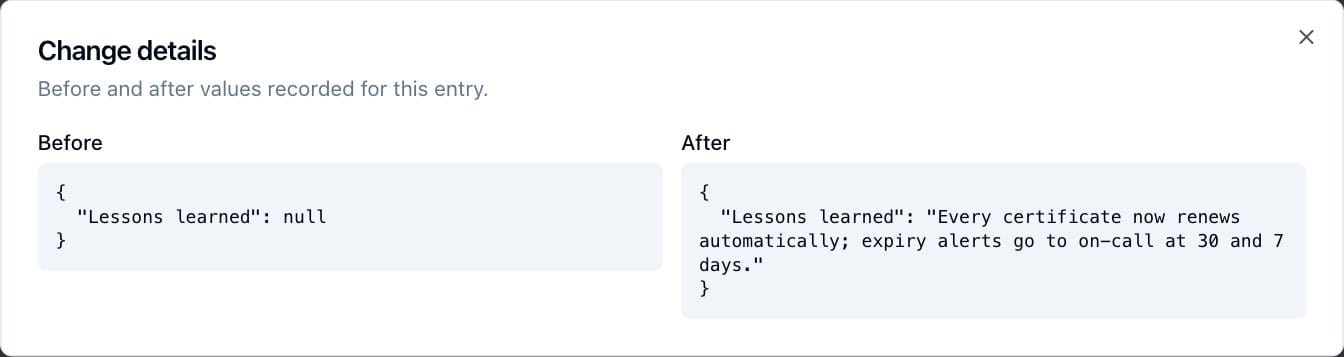
Click View diff in the Changes column to open Change details, with the Before and After values side by side, exactly as recorded.
10.2.3 Exporting
Export CSV downloads the entries matching the current search and filters, with the columns When, Actor, IP, Module, Action, Entity, Entity ID and Changes. Times are in UTC (ISO 8601). An export holds at most 5,000 rows; when more match, a warning tells you so; narrow by day with the When filter, or by module, action, entity or actor, and export each part.
The Changes column of the export holds the recorded change as compact JSON,
with its before, after and, where recorded, source values. It is empty
for entries that record no change.
10.3 The hash chain
Every audit entry carries three values set by the database when the entry is inserted: a sequence number (its chain position), the hash of the previous entry, and its own hash. The hash is SHA-256 over the entry's content and the previous hash:
| Hashed, in order | |
|---|---|
Format tag audit-v1 | |
| Previous entry's hash | All zeros for the first entry |
| Entry id, timestamp, actor email, module, action, entity type, entity ID, changes, IP, API token id | Each length-prefixed, so no value can shift into its neighbor |
The actor's user id is deliberately outside the hash: deleting a user clears it, and a restore links it back, without breaking the chain.
Because each hash covers the one before it, changing, deleting or reordering any entry breaks every link after it. The database protects the chain in three layers:
- Insert trigger. A database trigger computes the position and hashes under a lock, so concurrent writes form one linear chain and no application code can skip it.
- Append-only trigger. Updates and deletes on the audit log are refused by the database, from the application or any other client, except the two maintenance operations below.
- Separate database role. The application connects as a role (default
grc_app) that may only read and insert audit entries, owns nothing, and cannot change or disable the triggers. Only the database owner can.
The two maintenance operations run as owner functions: pruning (below) and relinking actor ids after a restore.
Within these limits, the chain is tamper-evident to everyone except the
database owner. Someone holding the owner credentials could, in principle,
rewrite entries and recompute the chain after them. Keep the owner password
(DATABASE_URL for the migrate container) out of daily use, and record the
result of each verification outside TraxrGRC (below), so a rewritten
chain disagrees with your record.
10.3.1 Verifying the chain
On screen, administrators:
- Open
/settings/audit-log. - In the Integrity card, click Verify audit log.
- Read the result under the button:
- "Intact: N entries verified (chain positions A to B)." Every entry from position A to B links correctly and matches its hash.
- "Broken at entry <id> (<reason>) after N intact entries." The first entry that fails, or "at the end of the chain" when entries are missing from the end.
| Reason | Meaning |
|---|---|
hash-mismatch | The entry's content was changed after it was written |
prev-hash-mismatch | The entry does not follow the one before it: an entry was replaced or reordered |
sequence-gap | An entry was removed |
head-mismatch | Entries were removed from the end of the chain |
unchained | An entry exists without chain values |
before-anchor | An entry older than the last prune remains, so the prune record was tampered with |
Verification reads the whole log in a single consistent snapshot, in batches
of 5,000, and is itself recorded as an auditLog verify entry with the
result.
From the command line, on a Docker Compose deployment:
docker compose exec web ./node_modules/.bin/tsx prisma/audit-verify.ts
It prints the result as JSON, for example
{"ok":true,"rows":18234,"fromSeq":0,"toSeq":18234}, records an auditLog
verify entry with actor system and "via":"cli", and exits with status 0
when intact, 1 when broken and 2 on error. Run it on a schedule (cron, your
monitoring system) and alert on a non-zero exit; see Security Hardening.
10.3.2 What to do if verification fails
- Do not prune, restore or otherwise change the database. Take a backup (see Backup and Restore) and keep it as evidence.
- Note the entry id and reason. Look at the entries around it in the table.
- Compare with your most recent backup: restore it to a separate instance and verify there to establish when the break appeared.
- Treat it as a security incident: the change needed database owner rights or direct access to the database files.
10.4 Retention
The audit log is kept indefinitely unless an administrator prunes it. To prune:
- In the Retention card, enter Older than (days), 365 to 3650 (default 365).
- Click Prune… and confirm Prune audit entries? with Prune.
The database removes the oldest run of the chain whose entries are all older than the cutoff, strictly in chain order, and records the last removed entry as the anchor that verification starts from. An old entry appended late, for example by a restore, waits until everything before it is old enough too. The database itself refuses to delete anything less than 365 days old, whatever the request.
Each prune writes an auditLog delete entry with the cutoff and the number
removed, and emails every administrator ("Audit log entries pruned"). After a
prune, verification reports chain positions from the anchor onward.
Before pruning, export or back up the period you remove if your retention policy requires you to keep it. Backups contain the audit log; see Backup and Restore for how a restore treats the live log.
10.5 Security alerts
Every active administrator is emailed (template security.alert, see
Notifications and Email) when any of these happen:
| Alert title | Raised when |
|---|---|
| Sign-in locked after repeated failures | A throttle lock is set |
| Repeated failed sign-ins for one account | An account reaches ten failures in 15 minutes |
| Administrator rights granted | An account is created as, or made, an administrator |
| Administrator rights removed | An administrator is demoted or deleted |
| Break-glass administrator signed in with a password | During SSO only |
| SSO-only sign-in turned off | |
| Audit log entries pruned | |
| Database restored from a backup | |
| Integration settings changed | SMTP, LDAP or SAML saved |
| API token created | |
| Session or API token limits changed | Settings → Sessions saved |
| Separation of duties setting changed | |
| AI assistant (MCP) access changed | |
| DPIA approval settings changed | |
| SCIM provisioning setting or token changed | |
| Administrator deactivated by SCIM provisioning | |
| Two-step verification reset for a user | An administrator resets a user's two-step verification |
| Two-step verification locked after repeated wrong codes | An account reaches 10 wrong code attempts in 15 minutes after a correct password |
| Two-step verification requirement changed | The requirement on Settings → Sessions is turned on or off |
Alerts need SMTP to be configured. Each one is listed in the Notifications delivery log.
10.6 Evidence file fingerprints
Every attachment gets a SHA-256 fingerprint of its bytes at upload, stored on its row and recorded in the upload's audit entry. Files uploaded before fingerprinting existed are hashed by the worker: once when it starts and again in each nightly run, until every file present has one. It only reads files; a file missing from the uploads volume stays without a fingerprint.
On an evidence record, Verify files re-hashes each stored file and
reports it as matching, changed since upload, or missing, with a verify
audit entry. A changed or missing file means the uploads volume no longer
holds what was uploaded: check the volume and the server backup (Backup and
Restore). After restoring the uploads volume, Verify files on the evidence
an assessor relies on confirms the files came back intact.
Locked evidence (USER-MANUAL, Locked evidence and file fingerprints) keeps
its files, its dates and its links to completed control tests. The nightly
run locks evidence that supports a recorded test result once its newest
file is a day old. Unlocking needs evidence:delete at the all level and a
reason, so in the built-in roles only GRC Manager and administrators can
unlock; give that right sparingly.
10.7 Files moved onto evidence
Controls, compliance requirements and account reviews take evidence records
instead of loose files (USER-MANUAL, Files on controls, requirements and
account reviews). Files attached to them before that are moved by the worker
when it starts, after the fingerprint backfill: each becomes an evidence
record linked to the same record, typed "Other: Migrated from control" (or
requirement, or account review), owned by the record's owner, with the file
moved onto it unchanged. Each move is a create audit entry under the
evidence module by system, naming the attachment and where it came from.
A file whose record no longer exists stays where it is. Later starts find
nothing to move. The people who could read those files now need
evidence:read to see them; check custom roles before the update.
10.8 Using the audit log as evidence
The audit log supports common control requirements such as NIST SP 800-53 AU-2, AU-3, AU-9 and AU-10, ISO/IEC 27001 Annex A 8.15, and SOC 2 CC6 and CC7 change and access monitoring. When an auditor asks for evidence:
- Show integrity first. Click Verify audit log (or run the command
line check) and capture the "Intact" result with its chain positions and
time. The
auditLogverifyentry in the log records the same. - Show completeness of coverage. Point to this chapter's list of what is recorded, and to the append-only and separate-role protections. Show a sample entry for each relevant category with View diff.
- Produce the population. Filter to the category in scope and use Export CSV; the log is sorted newest first. For populations over 5,000 rows, export day by day with the When filter, or by module, action or actor, or extract the period from the database (below).
- Show access to the log. List who holds
auditLog:read(the groups carrying GRC Manager, Auditor or a custom role with it) and the administrators. Only administrators can verify or prune. - Show retention. Filter Module
auditLog, Actiondeleteto show every prune and its cutoff, or show that there are none.
Typical evidence requests and how to answer them:
| Request | Answer from the log |
|---|---|
| Access changes during the period | Module users: user, group and role entries with before and after |
| Privileged access granted | Module users, Entity user, entries where isAdmin changed; the matching "Administrator rights granted" alerts |
| Terminated users removed promptly | The users update setting isActive to false (or scim.deprovision), compared with the HR termination date |
| Failed and successful sign-ins | Module auth |
| Configuration changes | Module settings |
| Approvals and exceptions decided by the right person | The module's decision entries; self-approved decisions carry selfApproved: true |
| Evidence the log was not altered | The verify entries over the period, plus your external record of results |
10.8.1 Keeping an external record
For the strongest evidence, record each verification outside TraxrGRC:
run the command line check on a schedule, keep its JSON output (with the
date) in a system the database owner cannot change, such as your SIEM or a
write-once store. If the chain is ever rewritten, the recorded toSeq values
and dates will not match what a later verification reports.
For extracting full entries with their diffs and hash values, the audit log
is the audit_log table in the PostgreSQL database; a read-only query by an
administrator (for example with psql in the db container) returns every
column, including chainSeq, prevHash and hash. See Backup and Restore
for database access.