8 Loading and Importing Data
This chapter covers bringing data into TraxrGRC: what a new installation already holds, CSV imports per module, compliance framework packages, the bundle loader for a full migration over the API, a step-by-step plan for a first-time migration, and the demonstration data that must never be loaded on a production instance.
8.1 Choosing a method
| Method | Best for | Runs as | Writes |
|---|---|---|---|
| CSV import (Import button on a list) | Registers kept in spreadsheets; bulk updates | The signed-in user, in the browser | Risks, controls, assets, policies, third parties, incidents, projects, audit findings; new risk, compliance and policy exceptions |
| Account review CSV (Import CSV on a review program) | The accounts to review | The signed-in user | Review items |
| Compliance package import (Compliance → Packages → Import) | A framework's requirement tree | The signed-in user | One package, its items and an analysis per item |
Bundle loader (scripts/load-bundle.ts) | A full, repeatable migration with requirement mappings | An API token | Risk scale, classifications, a package, controls, policies, risks, requirement mappings and statuses |
| REST API | Anything else, and ongoing integrations | An API token | Most records (see API Access and Integrations) |
Every method goes through the same services and checks as the screens: the same validation, the same permission rules (including own-level access), and an Audit Log entry and History entry for every record.
8.2 What a new installation already contains
The migrate service adds reference data on every start, without changing
or deleting anything that exists:
- the four system roles (GRC Manager, Risk Owner, Auditor, Data Liaison);
- four risk classifications, the 5 × 5 likelihood and impact scales, the matrix and four appetite bands (only when those tables are empty);
- every email template (missing keys only);
- the shared dashboard layout, kept on the shipped default until someone changes it (see Bootstrapping the first administrator);
- the default data mapping questionnaire, "Processing activity" (only when there are no questionnaire templates).
Nothing else: no users besides the first administrator, no groups, packages, labels, custom fields, incident classifications, business units or records.
8.3 CSV imports
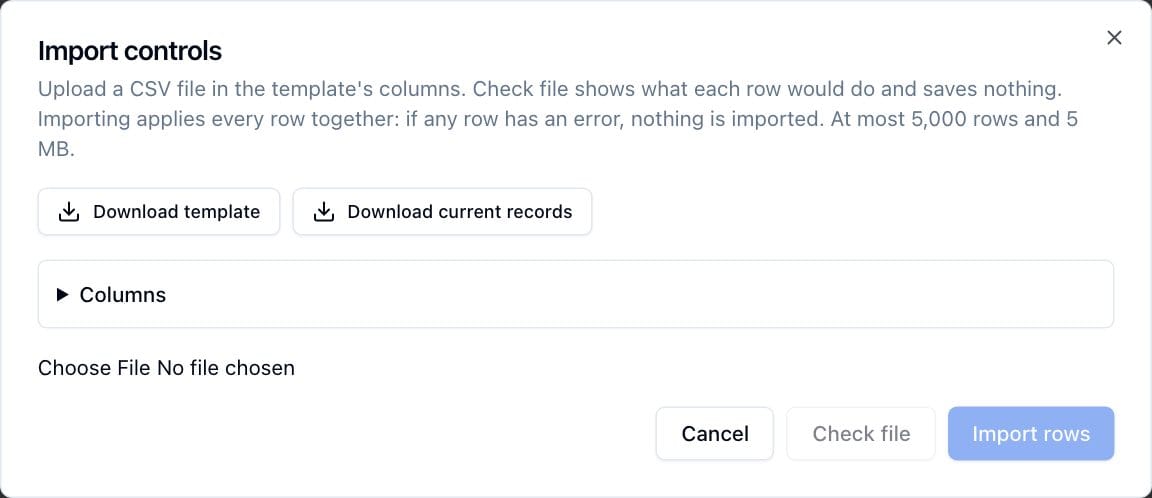
Most module lists have an Import button beside New. On Risks, Policies and Compliance a menu offers the record type; audit findings are imported from the Audits page. The button appears only to people who may create or update those records (for exceptions, update on the parent records). The User Manual describes the dialog step by step (Getting Started, Importing from CSV); this section is the administrator's reference.
8.3.1 Record types and columns
| Import | Page | Permission | Columns | Custom fields |
|---|---|---|---|---|
| Risks | Risks | risks:create or risks:update | id, title*, description, classification*, inherent_likelihood*, inherent_impact*, asset, business_unit, owner, owner_group, review_frequency_months, status | Yes |
| Controls | Controls | controls:create or controls:update | id, name*, description, type, status, owner, owner_group | Yes |
| Assets | Assets | assets:create or assets:update | id, name*, description, business_unit, owner, owner_group | No |
| Policies | Policies | policies:create or policies:update | id, title*, description, owner, owner_group, review_frequency_months | Yes |
| Third parties | Third Parties | thirdParties:create or thirdParties:update | id, name*, description, type, status, website, owner, owner_group | Yes |
| Incidents | Incidents | incidents:create or incidents:update | id, title*, description, classification, opened_at, asset, third_party, owner, owner_group, status, resolution | Yes |
| Projects | Projects | projects:create or projects:update | id, title*, description, status, deadline, owner, owner_group | Yes |
| Audit findings | Audits | audits:create or audits:update | id, audit_plan*, title*, description, status, deadline, control, owner, owner_group | No |
| Risk exceptions | Risks | risks:update | risk*, title*, description*, owner, approver, expires_at* | No |
| Compliance exceptions | Compliance | compliance:update | package*, requirement*, title*, description*, owner, approver, expires_at* | No |
| Policy exceptions | Policies | policies:update | policy*, title*, description*, owner, approver, expires_at* | No |
* Required when a row creates a record.
Allowed values:
| Column | Values |
|---|---|
Risk status | open, closed or archived |
Risk inherent_likelihood, inherent_impact | The level's value or name from Risk Settings |
Control type | policy, process, technical, physical or other (process when blank) |
Control status | planned, active or retired (active when blank) |
Third party type | vendor, partner, customer or other (vendor when blank) |
Third party status | active, offboarding or terminated |
Incident status | open or closed; closing needs a resolution |
Project status | planned, in_progress or completed (planned when blank) |
Audit finding status | open, in_remediation or closed (updates only) |
review_frequency_months | 1 to 120 (12 when blank on a new record) |
Dates (opened_at, deadline, expires_at) | YYYY-MM-DD |
Values like statuses are matched without regard to case, spaces or underscores.
8.3.2 File rules
- Header row. The first row names the columns. Matching ignores case,
spaces and punctuation, so
Owner Groupmatchesowner_group. Columns the import does not know are listed and ignored; a column named twice refuses the file. - Encoding. Save the file as UTF-8 ("CSV UTF-8" in Excel). Other encodings garble accented characters.
- Create or update. A row with an
idupdates that record; a blankidcreates one. Third parties without an id are matched by name, which is unique. Exceptions can only be created. Nothing is ever deleted. - Blank cells keep values. A blank cell leaves the existing value unchanged, so a file can carry only the columns you want to change. A value cannot be cleared by import.
- People and lookups.
ownerandapproverare active users, by email address or full name (use the email when two people share a name).owner_group,classificationandbusiness_unitare named as they appear in the app. Linked records (asset,third_party,control,risk,policy,audit_plan) take a name or an id and must be records the importer can read; a name that matches several records asks for the id. - Custom fields are columns headed
Custom: <field name>. Checkbox fields take yes or no; multi-select fields separate options with a semicolon. - Limits. At most 5,000 data rows and 5 MB per file. Split larger files.
- Formulas are stored as text. A cell beginning with
=,+,-,@, a tab or a carriage return is stored as plain text and never evaluated. Every CSV export prefixes such values with a single quote so a spreadsheet does not run them, and the import removes that quote again, so an exported file re-imports unchanged.
8.3.3 What an import does
- Check file runs every row through the record's own service inside a database transaction and then rolls it back. The result table shows what each row would do (Create, Update with the changed columns, Unchanged, or Error with every reason by line number). Nothing is saved.
- Import rows runs the same again and keeps the result only when every row succeeds. If any row fails at that moment, nothing is imported.
- Each record's History shows the change, marked as coming from "CSV import
of" the file name, and one summary Audit Log entry (action
import) records the file, the row count and the outcome counts. - Notification rules ignore imported changes unless Notify on API changes and CSV imports is on (see Notifications and Email). Fixed reminders are unaffected: once imported, records are reminded like any other.
Download current records gives the records the importer can read, in the template's columns with ids filled in (at most 5,000). Edit it and import it back for bulk updates.
What CSV imports do not cover: policy content and approvals, risk treatments and reviews, control testing schedules, personal data breach details on incidents, the data map fields on assets, business units, audit plans, requirement mappings and anything in the privacy module. Use the app, the bundle loader or the REST API for those.
8.4 Compliance framework packages
A package is one framework (NIST SP 800-53, ISO/IEC 27001, the GDPR, a contract's security schedule) as a tree of headings and requirements. Each requirement gets an analysis, where its status is assessed.
8.4.1 Importing a package
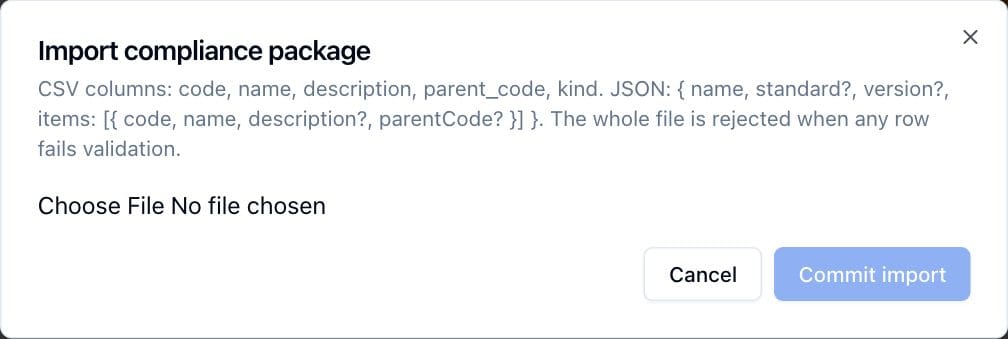
Compliance → Packages → Import (needs compliance:create at all) reads a
CSV or JSON file, previews the tree, and creates the package with Commit
import. The file is refused as a whole when any code or name is empty, a
code repeats, a parent_code names a code not in the file, or parents form a
cycle.
| Format | Content |
|---|---|
| CSV | Header with code and name, optionally description, parent_code (also parent) and kind. One row per item. The package name, standard and version are typed in the dialog. |
| JSON | { "name", "standard", "version", "description", "items": [ { "code", "name", "description", "parentCode", "kind" } ] }. Name and at least one item are required. |
kind is requirement (blank means requirement; counts toward compliance),
additional (listed, counted separately) or heading (structure only).
Limits: up to 10,000 items, codes up to 100 characters, names up to 300.
Every package exports from its row on the Packages page as JSON in exactly this shape, so a package can be copied between instances.
The import dialog sends the whole package to the server in one request. Screen requests are limited to 1 MB by the web framework, so a very large framework file may be refused there. Load such a file through the REST API instead, which accepts the same JSON:
curl -X POST https://grc.example.com/api/v1/compliance/packages \
  -H "Authorization: Bearer $GRC_API_TOKEN" \
  -H "Content-Type: application/json" \
  --data-binary @package.json
The token needs compliance:create (see API Access and Integrations).
8.4.2 Framework content shipped with the source
TraxrGRC does not include licensed frameworks. Two public packages ship in the source and the container image, in the import JSON format, and can be imported on any instance:
| File | Content |
|---|---|
prisma/demo/nist-800-53-moderate.json | NIST SP 800-53 Rev 5 Moderate baseline: 18 families as headings, 287 controls and enhancements with their control statements. Public domain in the United States. Provenance in prisma/demo/README.md. |
prisma/demo/gdpr.json | The GDPR: 11 chapters as headings, 99 articles, 40 of them requirements and 59 additional. Descriptions are plain-language summaries written for the package, not the legal text. |
To copy one out of the running container and import it:
docker compose cp web:/app/prisma/demo/nist-800-53-moderate.json .
Then import the file with Compliance → Packages → Import. These files only create a package; they do not load any demo records.
For other frameworks, use content you are licensed to use: a purchased toolkit, the standard body's machine-readable release, or an export from your previous tool, converted to the CSV or JSON shape above.
8.4.3 Mapping requirements
A requirement's analysis links it to the controls, policies and risks that address it, and to remediation projects. Mappings can be made:
- in the app, on the requirement's page (see the User Manual, Compliance Management);
- in bulk with the bundle loader's
requirementssection (below); - through the REST API, on
/api/v1/compliance/analyses.
CSV imports do not map requirements.
8.5 The bundle loader
scripts/load-bundle.ts loads a complete set of existing GRC data into an
instance over the REST API: a risk scale, classifications, a compliance
package, controls, policies, risks, and each requirement's mappings and status.
It is built for go-live and for running again whenever the source changes.
The loader is generic; a separate exporter, kept with the client's data and
never in the TraxrGRC repository, turns the client's registers into a
bundle file. The full format reference is docs/LOADING.md.
8.5.1 Before you run it
-
A workstation with the source. The loader is not in the container image. Use a checkout of the TraxrGRC source at the same version as the instance, with Node.js 22 and its dependencies installed (
npm ci). The workstation only needs HTTPS access to the instance. -
Outside approvals, if the bundle has them. Policies with
effectiveDateandsignatoriesneed Settings → Policies → Allow recording outside approvals turned on. -
An API token created by an administrator (a token never exceeds its creator's rights), with these scopes:
Module Rights Why Risks Read, Create, Update Risks, treatments, reading the risk scale Controls Read, Create, Update Controls; reading them for mappings and treatments Policies Read, Create, Update, and Review when the bundle records outside approvals Policies and approvals Compliance Read, Create, Update Package, analyses and mappings Settings Create, Update Classifications and the risk scale Trimming this list breaks the load: scopes bound everything a request does, so mapping fails without Read on Controls, Policies and Risks. Give the token a short expiry and revoke it after go-live.
8.5.2 Running it
export GRC_API_TOKEN=aat_...
npm run load -- bundle.json --url https://grc.example.com            # dry run
npm run load -- bundle.json --url https://grc.example.com --apply    # write
| Option | Meaning |
|---|---|
--url | The instance's address. Required. |
--apply | Write. Without it the loader only reads the instance and reports what it would do. |
--token-file <path> | Read the token from a file, keeping it out of the shell history. Otherwise GRC_API_TOKEN is used. |
--ca-file <path> | Trust a private certificate authority, for an instance behind an internal CA (for example Caddy with tls internal). |
The bundle is validated first; any problem stops the run before anything is
read or written, listing up to 50 problems. The dry run then prints, per
record kind, how many records it would create, update or leave unchanged, plus
warnings. --apply does the same and writes. The command exits with status 1
if any write failed, so it can run in a pipeline.
Every write goes through the API, so it is validated, recorded in the Audit Log against the token, and sends no rule emails unless Notify on API changes and CSV imports is on.
8.5.3 Running it again
Each record in a bundle carries a ref, the source's permanent identifier,
and its title or name starts with that ref followed by a space
(R-01 Ransomware reaches...). A later run finds records by that prefix and
updates them. Nothing is ever deleted, and owners are never set (assign them in
the app). Highlights of the re-run rules:
- The risk scale is replaced only when it differs, and never while a risk uses a level the new scale drops.
- An existing package is left alone; item codes missing from it are reported.
- Controls get their name, description, type and status updated.
- A draft policy is updated; a published policy gets new content only when the bundle carries a later effective date (a reissue).
- Risks get title, description, classification, status and inherent levels updated; a residual that no longer matches is reported, for adjustment through the risk's treatments in the app.
- Requirement mappings are only added, so mappings made by hand survive.
- A requirement status is set only while its analysis is still Not reviewed; an assessment made in the app always wins.
The full table is in docs/LOADING.md.
8.5.4 Bundle format in brief
{
  "format": "grc-bundle",
  "version": 1,
  "source": "Exported from the 2026 risk register and SSP",
  "riskScale": { "likelihood": [], "impact": [], "cells": [], "bands": [] },
  "package": { "name": "...", "standard": "...", "version": "...", "items": [] },
  "classifications": [{ "name": "Availability" }],
  "controls": [{ "ref": "AC-2", "name": "AC-2 Account Management" }],
  "policies": [{ "ref": "POL-110", "title": "POL-110 Acceptable Use" }],
  "risks": [{ "ref": "R-01", "title": "R-01 Ransomware halts production" }],
  "requirements": [{ "code": "AC-2", "controls": ["AC-2"], "policies": ["POL-110"], "risks": ["R-01"] }]
}
Rules the validator enforces: refs unique per record type and up to 60
characters; titles and names start with their ref; free text up to 100,000
characters; residual likelihood and impact never above inherent; every risk's
classification listed in classifications; with a riskScale, every risk's
levels on that scale and a matrix cell for every pair; requirements only with
a package, naming its item codes and refs in the same bundle; policies
published from the bundle carry their content.
Each risk needs a residualBasis, which becomes an implemented mitigate
treatment carrying the residual rating, and may carry a plannedTreatment.
8.6 First-time migration
Whether the data comes from spreadsheets or another GRC tool, load it in an order where everything a record refers to already exists. There is no direct importer for another vendor's database: export that tool's registers to CSV (or write an exporter to a bundle) and load them with the methods above.
- Freeze the target. Configure branding, SMTP and sign-in, but tell users the instance is not live yet. Decide whether rule emails stay suppressed during the load (the default).
- Settle the risk method. Set classifications, magnitudes, matrix and
appetite bands in Risk Settings, or put them in the bundle's
riskScale. Map the old tool's ratings to the new values in writing. - People. Create users and groups, or let SSO, LDAP or SCIM create them (see Authentication and Single Sign-On). Owners in every import must be active accounts, and owner groups must exist.
- Supporting lists. Create business units (Risk Management → Business
Units, or
/api/v1/business-units), incident classifications, labels, custom fields and audit plans. None of these has a CSV import. - Catalogs. Import controls, assets and third parties.
- Frameworks. Import compliance packages.
- Policies. Import titles, owners and review frequencies by CSV, then add content and approvals in the app, or load them by bundle with content and outside approvals.
- Registers. Import risks (linking assets and business units), incidents (linking assets and third parties), projects, and audit findings (naming their plan and control).
- Exceptions. Import risk, compliance and policy exceptions once their parent records exist. They arrive as requested; decide them in the app.
- Mappings and treatments. Map requirements and add risk treatments in the app, by bundle, or over the API.
- Check. Run the Report Center reports, compare counts with the source, and open a sample of records. Review the Audit Log entries for the load.
- Before go-live, look ahead at reminders: the first daily sweep after the load emails owners about every review, control test and expiring exception that is due or overdue in the loaded data. Correct wrong dates first, and tell owners to expect the emails.
- Revoke migration tokens and switch on any notification rules.
Keep the source files and the loader output with the migration records; the Audit Log entries carry the token and file names that tie each change back to them.
8.7 Demo data
The source includes a sales demonstration: a fictional company, Quillmont
Systems, with records in every module, NIST SP 800-53 Moderate and the GDPR as
packages, notification rules, scheduled reports and eight sign-in personas.
It is loaded by prisma/demo-seed.ts (npm run db:demo) and described in
docs/DEMO.md.
Never load the demo on an instance that will hold real data. It creates fictional people with working sign-in accounts (one of them an administrator), dozens of fictional records across every module, notification rules and scheduled reports that email those people, and sets branding and settings (product name "TraxrGRC", outside approvals on). Its records are created through the normal services, so they are written into the hash-chained Audit Log, which cannot be edited or pruned for a year. There is no way to remove the demo afterward; the only clean path is a new, empty database.
Two safeguards exist:
- The demo seed refuses an instance in use (
prisma/demo/guard.ts). Before writing anything, it counts rows in the tables an organization fills (risks, controls, assets, business units, packages, policies, third parties, incidents, incident classifications, audit plans, projects, awareness programs, records of processing, account review programs, assessment templates, custom fields, labels, groups, notification rules, report schedules and API tokens) and refuses if any has rows, if any user other than an administrator exists, or if a demo account already exists. It never deletes. A freshly installed production instance is still empty, though, and the guard accepts it, so the real protection is not running the command there. - The older development seed refuses production.
prisma/seed.ts(npm run db:seed, also whatprisma db seedruns) begins by deleting the data in every table. It refuses to run whenNODE_ENVisproduction, as it is in the container image, unlessALLOW_DEMO_SEED=1is set. Never set that variable on a real instance.
To show the product, run the demo on a separate instance with its own database
and its own address (see docs/DEMO.md), and keep its accounts file private.